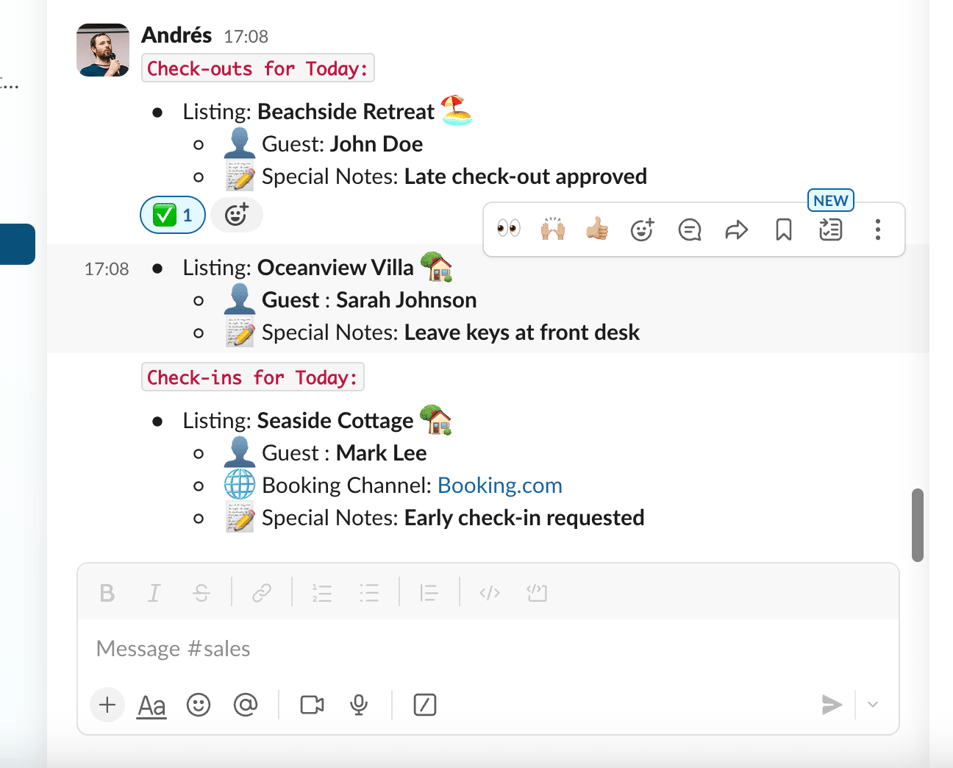
We recently worked on this automation for an West Coast company. This automation helps the operations team stay on top of daily check-ins and check-outs by posting a detailed report to Slack at 6 AM each day.
The report is split into channels based on property tags.
The team can react to the messages with emoji or add comments in threads, allowing for real-time updates and collaboration.
Waking up knowing who is going to check in and out
Imagine starting your day as an operations manager for a property management company. As you open Slack, you see two new messages in separate channels. It’s 6:00 AM, and the automation has already taken care of preparing today’s check-ins and check-outs for you.
You click into the Property 1 channel. At the top of the feed, a post from the automation bot is neatly organized, listing all the check-outs for the day, followed by the check-ins.
The message reads something like this:
Check-outs for Today:
• Listing: Beachside Retreat
• Guest Name: John Doe
• Booking Channel: Airbnb
• Special Notes: Late check-out approved
• Type: Check-out – Today
• Listing: Oceanview Villa
• Guest Name: Sarah Johnson
• Booking Channel: Vrbo
• Special Notes: Leave keys at front desk
• Type: Check-out – Today
Check-ins for Today:
• Listing: Seaside Cottage
• Guest Name: Mark Lee
• Booking Channel: Booking.com
• Special Notes: Early check-in requested
• Type: Check-in – Today
Each of these check-ins and check-outs is structured the same way. You can see guest names, booking platforms (e.g., Airbnb, Vrbo, Booking.com), and any special notes related to their stay (like early check-in or late check-out requests). This gives you a clear snapshot of the day’s guest traffic.
Interaction
Now, let’s say you just saw a notification from your front desk that John Doe, staying at Beachside Retreat, has already checked out. You want to mark this in the system to keep everyone in the loop.
Here’s how you interact with the report:
Emoji Reaction: You hover over John Doe’s listing and react with the ✅ emoji, indicating that the check-out is complete. This simple action signals to everyone on the team that the task is handled.
Threaded Conversations: If there’s more to communicate about John Doe’s check-out, you can click “Reply in Thread.” Maybe there was an issue with cleaning, or the guest left a note. In this thread, you and your team can discuss the check-out without cluttering the main channel.
This process is repeated for every guest on the list. As other team members react with emojis and leave comments, you quickly see which guests are handled and which ones might need more attention.
End-of-Day
As the day progresses, you or your colleagues will see more reactions and comments pop up on the thread. Maybe a team member marked Sarah Johnson’s check-out as still in progress (🕒 emoji), and another team member later marked it complete. You can see the entire history of what happened for each guest, all within Slack, making it easy to track the team’s activity without missing a beat.
Key Benefits for the Operator
Real-Time Overview: You get an instant snapshot of daily check-ins and check-outs right at 6 AM, saving time from manually pulling this information from Guesty.
Simplified Communication: Your team can react with simple emojis (✅ for completion, 🕒 for in-progress) to update the status, and use threaded replies for deeper conversations about specific guests.
Organized by Property Tags: By separating properties into different Slack channels, you avoid clutter, keeping the information targeted and relevant for each team handling those properties.
In short, the automation frees you from repetitive tasks and allows your team to focus on more meaningful work—whether that’s improving guest experiences, coordinating with housekeeping, or resolving any last-minute issues with check-ins.
Need support setting this up? We can help!
Discover how our tailored automation solutions can transform your operations, making daily tasks more efficient and freeing up your team for higher-value activities. Book a call with us today to see how we can help streamline your property management processes.
Build an automated crawler that finds broken links and missing images, logs each issue to Notion, and routes fixes to an owner, so you skip the manual audits.