Connect RingCentral (or any phone system) to Gorgias using Pipedream

Connect RingCentral (or any phone system) to Gorgias using Pipedream

View Details
Unsplash Cover
Unsplash Cover
Video
General
🔑 Keyword Goals
Generate LK
Generate NL
LinkedIn Post Content
🚀 Exciting news for businesses using Gorgias and RingCentral! If your phone system isn’t supported yet, you don’t have to wait any longer. With Pipedream, you can automate ticket creation from customer calls, complete with transcriptions, saving you valuable time.

In just a couple of hours, we set up a workflow that saves 20 minutes for each call received! 💡

Want to learn how to streamline your phone support? Check out the full blog post here: Connect RingCentral to Gorgias using Pipedream

#Automation #CustomerSupport #Gorgias #RingCentral #Pipedream #Productivity #Connex
Hidden
Full URL
Unsplash Cover
Unsplash Cover
KW AI GEN
RingCentral Gorgias integration workflow automation
Last edited time
Jul 27, 2026 05:35 PM GMT+0
Gorgias has integrations with some phone systems but what happens if yours isn’t supported yet?
 
💡 You don’t need to wait for them to implement it, and create tickets manually in the meantime!
 
You can provide phone support and automatically create tickets when customers call you.
Including transcriptions.
 
Enter Pipedream.
 
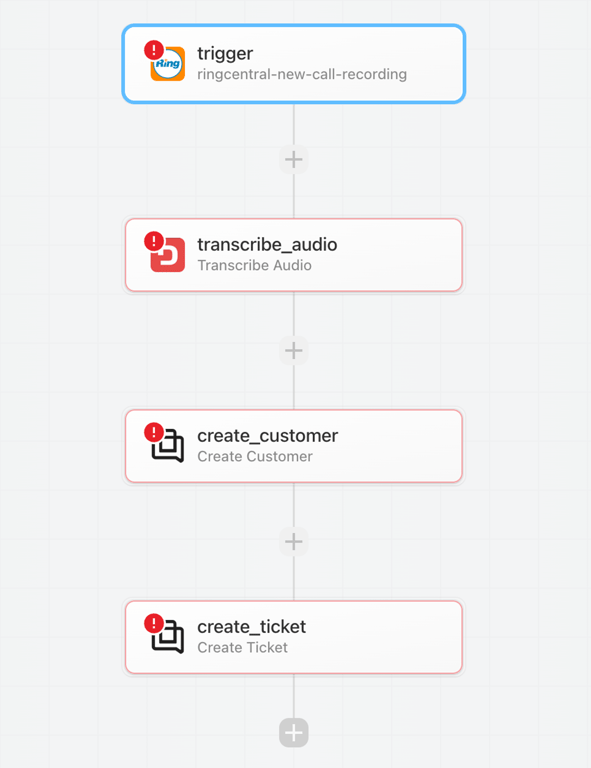
👉 Steps:
  1. Create an account on Pipedream
  2. Create a project and a workflow within
  3. Select RingCentral, New Call Recording as the trigger
  4. Send the recording to Deepgram for transcription
  5. Create a customer using its phone number
  6. Create a ticket using the transcription
 
✅ Results: in a couple of hours we implemented this workflow that now saves 20 minutes for each call received.
notion image

Need support setting this up? We can help!

notion image